Build Your Crypto App Faster with This UI Kit
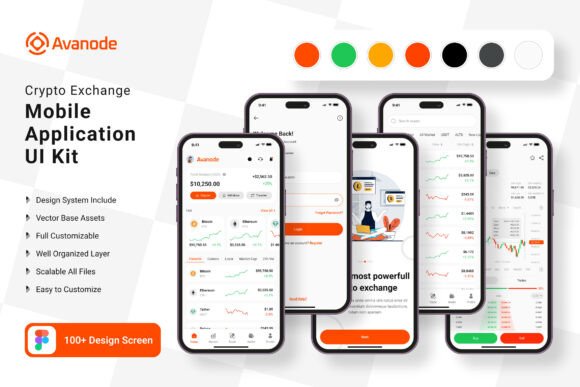
Imagine launching a sleek, professional cryptocurrency exchange app in a fraction of the usual time. The daunting task of designing every screen from scratch—balancing complex data with intuitive navigation—can stall even the most ambitious project. This is where a comprehensive Crypto Exchange App Mobile UI KIT becomes an invaluable asset, providing a foundation of 100 meticulously crafted templates that transform a complex development process into a streamlined, creative endeavor.
A Practical Toolkit for Modern Digital Projects
This UI kit is more than a collection of screens; it's a versatile design system. At its core are 100 pixel-perfect screen designs, each built with 100% vector layers for flawless scaling on any device. The kit includes over 80 reusable UI elements—from buttons and charts to navigation bars—ensuring visual consistency across your entire application. Because it's built for Figma, customization is intuitive. You can easily adjust color styles, swap components, and tailor layouts to match your specific brand identity, all without worrying about business process logic from day one.
The practical applications extend well beyond a standard crypto wallet. Consider how this structured approach to mobile UI design can benefit various projects:
- Entrepreneurs & Startups: Rapidly prototype and validate your fintech or blockchain app concept with investors and early users.
- UI/UX Designers: Accelerate client projects with a professional, scalable base, freeing up time for user research and unique interaction design.
- Small Business Owners: Develop a branded app interface for loyalty programs, payments, or customer portals without hiring a full design team.
- Content Creators & Marketers: Design engaging social media graphics, app store screenshots, or promotional materials that look cohesive and modern.
Enhancing Brand Recognition and User Trust
In the crowded digital marketplace, visual consistency is key to building trust. A user navigating your app needs to feel a sense of reliability, especially when dealing with financial transactions. The Crypto Exchange App Mobile UI KIT facilitates this by providing a unified design language. By using the same symbol objects, color styles, and typographic treatments across every screen—from the login flow to the detailed trading dashboard—you create a seamless experience that reinforces your brand's professionalism.
This kit is a powerful tool for brand identity development. The ability to easily change the primary color palette means you can adapt the entire interface to your brand's colors in minutes. Pairing the included free fonts with your existing logo and marketing materials helps create a cohesive ecosystem. Whether you're designing the app itself, its marketing website, or its social media presence, having a consistent visual foundation makes your brand instantly recognizable and more memorable to your audience.
Streamlining Workflow from Concept to Launch
One of the biggest advantages of using a pre-built mobile UI kit is the dramatic reduction in design and development time. Instead of starting with a blank canvas, you begin with a library of tested, aesthetically pleasing components. This allows your team to focus on what truly matters: refining the user journey, adding unique features, and ensuring the product meets market needs.
The structure of this particular kit is designed for efficiency. Every layer is fully organized, and every element is a reusable symbol. This means making a global change—like updating a button style or adjusting a corner radius—can be done once and reflected across all 100 screens instantly. This level of organization is crucial for collaborative projects, where designers and developers need to work from a single source of truth. It turns the design process from a series of isolated tasks into a fluid, integrated workflow.
Practical Considerations for Your Project
When integrating any design asset, thoughtful application is key. Here’s how to get the most out of a resource like this:
- Define Your Visual Goals First: Before diving into the templates, outline your app's core personality. Is it sleek and corporate, or vibrant and friendly? Use the kit's color and font customization features to align with this goal from the start.
- Prioritize Readability: While the templates are visually appealing, always test text legibility on actual mobile screens. Ensure sufficient contrast between text and background, especially for critical data like prices and transaction details.
- Customize, Don't Just Replicate: The kit is a starting point, not a final product. Add your unique branding elements, adjust layouts to fit your specific data structure, and consider adding custom illustrations or icons to stand out.
- Plan for Scalability: Think about future features. Choose template screens that can be easily adapted or combined as your app grows. The modular nature of the UI elements makes this expansion much simpler.
Remember, while the kit provides the visual framework, the success of your app will still depend on solid functionality, security, and a deep understanding of your users' needs. This UI kit handles the complex visual design layer, allowing you to pour your energy into those other critical aspects. All preview images are for demonstration only and are not included in the download, ensuring you have a clean slate to make the design truly your own.