Achieve Polished Metal Effects Instantly with This PSD Mockup
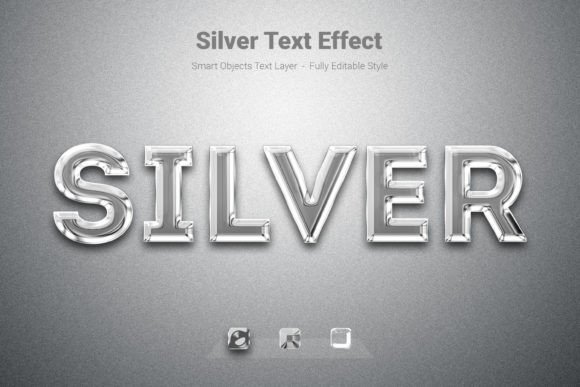
In the world of visual design, achieving a realistic, high-end metallic finish on text or logos usually requires advanced knowledge of lighting, gradients, and blending modes. For many designers, small business owners, and content creators, this process is time-consuming and technically demanding. The Silver PSD Text Style Effect Mockup changes this dynamic entirely. It provides a direct pathway to applying a professional, polished chrome or silver aesthetic to your typography and vector shapes without hours of manual editing. This tool is not just a filter; it is a comprehensive design asset that simulates real-world lighting and texture on your flat graphics, offering an immediate upgrade to your visual projects.
Understanding the Power of a High-Quality Text Effect
What makes this particular text effect stand out is its foundation in a high-resolution, fully editable PSD file. At 3000x2000 pixels and 300 DPI, the detail is crisp enough for both large-format print and high-definition digital screens. The RGB color mode ensures vibrant on-screen appearance, making it ideal for web design, social media graphics, and digital marketing assets. The process is streamlined for efficiency: you simply replace the contents of a smart object with your own text, shape, or logo, and upon saving, the effect is applied automatically. This non-destructive workflow means you can experiment freely, knowing your original artwork remains untouched.
The visual appeal of a silver or metallic effect is timeless. It conveys a sense of luxury, precision, and modernity. Whether applied to a bold sans-serif font for a tech startup logo or to an elegant script for a wedding invitation, the effect adapts to communicate quality and sophistication. This versatility is a key reason why such design assets are invaluable. They allow for rapid prototyping and ensure visual consistency across various materials, from a website header to a printed business card.
Practical Applications Across Creative Projects
The true value of a resource like the Silver PSD Text Style Effect Mockup is realized in its application. For branding and logo design, it can help a new business establish a memorable and professional identity. Imagine a boutique coffee brand using this effect on its wordmark for packaging and signage; the metallic finish suggests premium quality before the customer even tastes the product. Similarly, for social media graphics, it can make announcements, quotes, or sale promotions stand out in a crowded feed, increasing engagement through visual appeal.
Beyond digital use, this effect is incredibly useful for print materials. Consider the impact on event posters, album covers, or magazine editorial layouts. The simulated metallic texture adds a tactile dimension to flat print, catching the eye and encouraging closer inspection. For entrepreneurs creating merchandise, applying this style to t-shirt designs or mug graphics can elevate a simple product into a desirable item. The included free font used in the mockup provides a starting point, but the real power lies in applying the effect to your chosen typeface, ensuring it aligns perfectly with your brand's voice.
Integrating Typography into Your Visual Strategy
Choosing the right font style is a foundational decision in any design project. A display font with strong character might be perfect for a logo, while a clean sans-serif is better for body text on a website. The Silver effect works best on fonts with clear, defined edges. When pairing this effect with typography, consider the contrast. A highly detailed script font might lose some legibility when rendered in a complex metallic style, whereas a geometric sans-serif will showcase the effect's sharp reflections beautifully. Always test your chosen font with the effect to ensure readability is maintained, especially at smaller sizes.
This mockup encourages a practical approach to design. Instead of starting from scratch, you can use it to quickly visualize how a metallic treatment might look on your existing brand assets. It’s a tool for exploration and refinement. By reviewing the included features—high resolution, full editability, and smart object functionality—you can confidently incorporate it into your workflow for client projects or personal creative work. Remember to always verify the licensing of any design asset for commercial use, ensuring it aligns with your project's scope and distribution.
Enhancing Professional Presentation and Audience Engagement
Professional presentation is about more than just looking good; it's about communicating effectively. A well-executed metallic text effect can signal to your audience that you pay attention to detail and value quality. This subconscious message can enhance brand recognition and trust. For a marketing professional, using such an effect on a call-to-action button in an email campaign or on a webinar title slide can draw the eye and potentially improve click-through rates. For a blogger or content creator, it can make featured images or section headers more dynamic, keeping readers engaged longer.
The key is to use the effect with intention. Not every project requires a high-shine metallic finish. It’s most effective when used as a strategic accent—a headline, a logo element, or a key piece of information. Overuse can dilute its impact and lead to visual clutter. By applying the Silver PSD Text Style Effect Mockup judiciously, you create focal points that guide the viewer’s attention and reinforce your message. This thoughtful application of design assets is what separates a good project from a great one, ensuring your work not only looks polished but also achieves its communication goals.